EasyChat 1.16.0
What changed
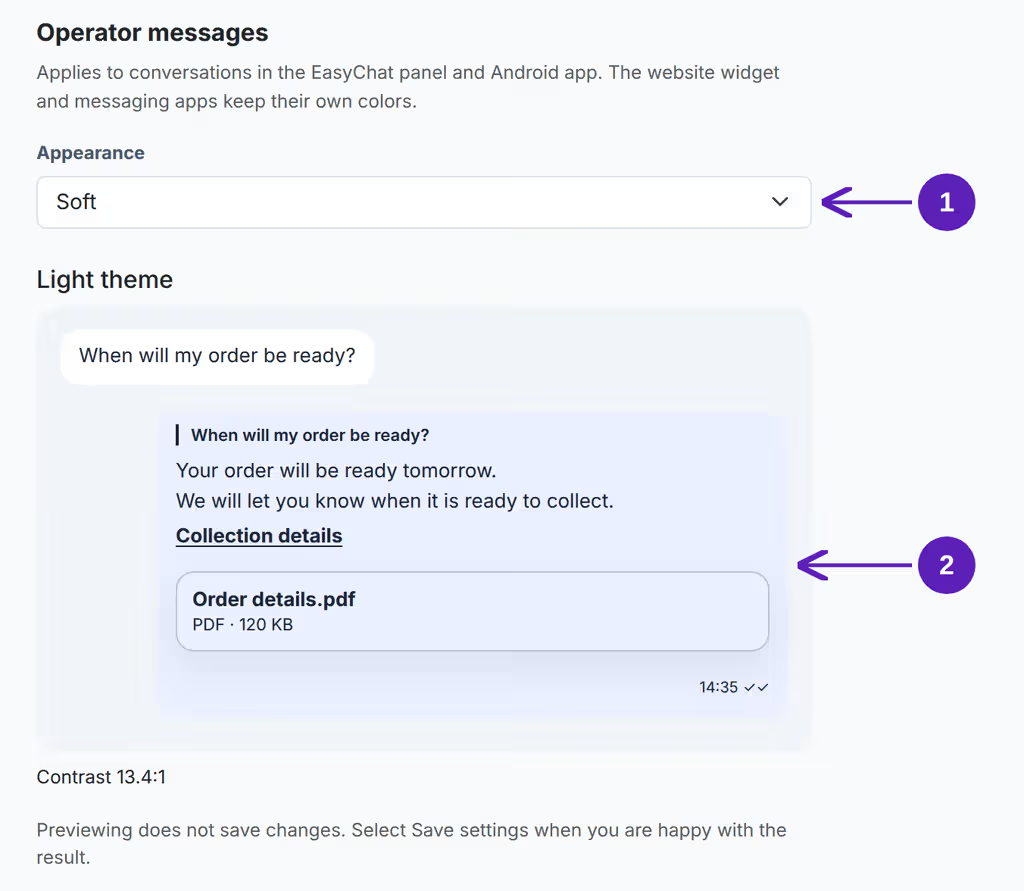
Your reply colours. Set operator message backgrounds and text independently of the brand colour. Choose a soft preset or custom colours with automatic readable text and a preview.
Clear paragraphs. Single line breaks, blank lines, lists and links retain their formatting in EasyChat.
More useful help. The assistant finds the instructions for disabling AI auto-replies and distinguishes questions about operator settings from requests to speak to a person.
Simpler maintenance. Settings show a single Cron command, and unsupported PHP versions receive a clear explanation before the module starts.
OpenCart updates. Environment checks and recovery of managed files after installation have been strengthened.
Set up appearance with the illustrated guide.
Who should read this
Operators who read and answer many messages in EasyChat, and administrators who want a branded interface with a comfortable conversation view.
What to check after update
Existing installations keep their previous colours. New installations use Soft. To change the appearance, open Settings → General → Operator messages and save your choice. These settings do not change VK, Telegram or website widget colours.
Android palette support is prepared in the app source and requires a compatible updated app version. This module release does not publish a new app to an app store.