EasyChat 1.18.0
Current for EasyChat
1.18.1+
Your chat. Your style. Make your workspace comfortable, with a calm colour, a gradient or a favourite image. Each operator chooses their own appearance.
What changed
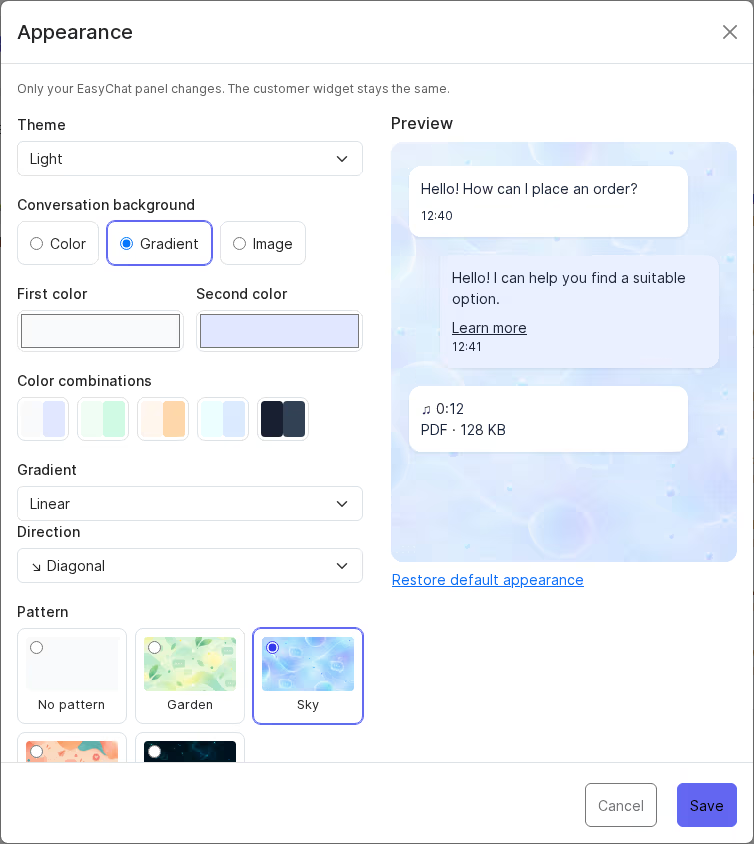
- Choose a colour, gradient or uploaded image for your conversation background.
- Create linear, radial and conic gradients using colour presets, different directions and an instant preview.
- Add repeating Garden, Sky, Peach or Cosmos patterns, with adjustable scale and intensity over your chosen background.
- Use a light, dark or device theme, or schedule theme changes in your time zone.
- Preview before saving. Cancel keeps your previous appearance, and you can return to the default look with one action.
- Resume updates from the saved phase. If the target version is already installed, the earlier operation closes without reinstalling its archive.
- Follow the revised first-run Cron guide so connected channels and background tasks are processed regularly.
Where to find it
Select your name or avatar → Appearance. These settings apply only to your web operator panel. The customer widget and Android app keep their own appearance. Upload JPEG, PNG or WebP images up to 5 MB; WebP availability depends on the server.

Who should read this
Operators who spend much of their day in conversations, and EasyChat administrators. Available for standalone installations and supported CMS packages. Existing conversations and settings are preserved during updates.
What to check after update
After updating
Last updated on